Adding and Removing Nodes
In Script Builder, you can easily add or remove nodes to build the trading indicator or strategy that you have in mind.
Adding Nodes
Adding a node in Script Builder is very easy. Just toggle on the sidebar by clicking the Add Nodes button in the upper left corner.

This will toggle open the Nodes sidebar on the right side of your screen.

You can drag and drop any row from the sidebar into the Script Builder working area (yellow background).

Removing Nodes
Removing a node is simple and easy. You can click the node you want to delete and press <- Backspace. Alternatively, you can click the ellipsis icon in the upper right corner of the node and select delete.
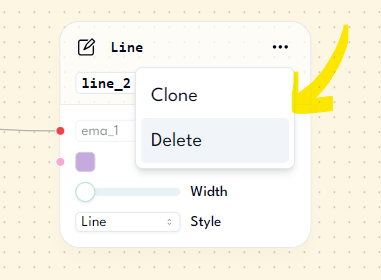
Once you delete a node, all of its edges/strings/lines attached to that node will also be deleted.
Summary
In this lesson, you learned how to add and remove nodes in the Script Builder. Adding a node is as easy as dragging it into the Script Builder's working area. Removing a node is as simple as clicking the node and hitting backspace.